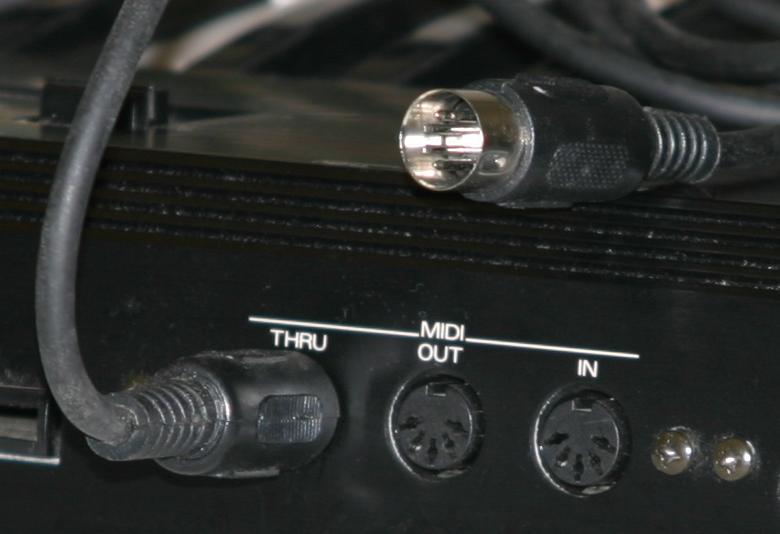
Yes, you can daisy-chain the machines on a small desk through their THRU ports, as long as one machine does all the sending. A THRU jack passes on an exact copy of whatever arrives at that machine’s MIDI IN, and nothing else. That is why a THRU chain cannot carry the keyboard and the groovebox’s own sequence at the same time. When two sources have to reach the same synth, you need a merge box, or a groovebox that passes the keyboard on from its OUT. When a machine in the middle has no THRU jack, or the chain gets long, you need a thru box.
MIDI in, out and thru do three different jobs
MIDI IN receives. MIDI OUT sends what the machine itself produces: its sequencer, its knobs, its clock. On a Digitakt II, for example, the MIDI tracks make no sound of their own and their sequencer data leaves through MIDI OUT or USB.
MIDI THRU forwards what came in. On the Digitakt II it duplicates the data arriving at MIDI IN, so it can be used to chain MIDI units together. A groovebox’s THRU never carries its own patterns. If the groovebox is meant to sequence a synth, the cable starts at its OUT.
Which grooveboxes have a MIDI thru jack
The Elektron Digitakt II and Octatrack MKII have a physical THRU jack, and the Roland SP-404MKII has a thru setting in its menu. The Tracker+, the Tracker Mini and the MPC One G2 have no THRU jack, and the Tracker+ has no thru setting either.
- Elektron Digitakt II: a physical MIDI In/Out/Thru with DIN Sync out. Both THRU and OUT can be switched to send DIN sync pulses instead, and no MIDI data is transferred over the port while that option is selected.
- Elektron Octatrack MKII: a physical MIDI THRU that echoes the data arriving at MIDI IN. Its Thru machines are a different thing altogether: they listen to the audio inputs, not to MIDI.
- Roland SP-404MKII: no THRU jack. MIDI IN and OUT are stereo minijacks. A Soft Through option in the system settings sends the messages arriving at MIDI IN back out of MIDI OUT without change.
- Polyend Tracker+ and Tracker Mini: MIDI In and MIDI Out only, on 3.5 mm minijacks, and both ship with a minijack to MIDI DIN adapter (Type B). The Tracker+ MIDI settings cover clock, transport, notes and CC routing, with no thru option.
- Akai MPC One G2: one 5-pin MIDI input and one 5-pin MIDI output, and no THRU jack among its connections.
When a thru chain works and when you need a merge or a thru box
A THRU chain works when one source feeds several receivers. The groovebox OUT goes to the first synth’s IN, that synth’s THRU goes to the second synth’s IN, and each synth listens on its own channel.
A thru box, often sold as a MIDI splitter, takes one input and copies it to several outputs. You need one when a machine in the middle of the chain has no THRU jack, because a MIDI output is designed to drive one input and only one. A Y-cable is not an option.
Chain length is the other reason. Each THRU stage can blur the edges of the signal slightly. Those small timing errors add up along the chain, which limits how many devices can be chained this way. The MIDI standard counts more than three instruments as a long chain. With a thru box, every synth gets its copy straight from the box instead.
A merge does the opposite job: it takes two sources and combines them into one output. A MIDI IN takes one cable, so when the keyboard and the groovebox both have to play the same synth, something has to combine them onto that cable: a merge box, or a groovebox that passes the keyboard on, as described below. A patchbay goes a step further and lets you change which source feeds which machine without recabling.
For a desk with one keyboard, one groovebox and two small synths, the simplest layout is keyboard OUT into the groovebox IN, groovebox OUT into the first synth, and that synth’s THRU into the second. The keyboard then reaches the synths only if the groovebox passes the keyboard’s notes on to its OUT. On the SP-404MKII, Soft Through does exactly that. On a groovebox without a soft thru setting, run the keyboard OUT and the groovebox OUT into a merge, and the merge OUT into the first synth.
How to wire a MIDI thru chain step by step
Nothing here needs tools or electrical work, only cables and menu settings. Switch the gear off before you connect anything, which Roland and Elektron both ask for in their manuals.
- Draw the chain on paper. Draw one arrow per cable, always from an OUT or a THRU to an IN, and never two arrows into the same IN. If two arrows want the same IN, that is where the merge goes.
- Pick one clock leader. Usually the groovebox leads and every synth follows external clock. Our guide to syncing a dawless jam with MIDI clock covers the settings. The clock travels down a THRU chain together with the notes.
- Connect the cables. Use standard 5-pin MIDI cables, no longer than 50 feet (15 meters). For minijack machines, use the adapter made for that machine. For a long time there was no common wiring for TRS MIDI, so two devices may use different wiring schemes, and an adapter from one brand can stay silent on another.
- Check that the jacks carry MIDI. On the Digitakt II, go to SETTINGS > MIDI CONFIG > PORT CONFIG and set OUT PORT FUNC and THRU PORT FUNC to MIDI. Set to DIN 24 or DIN 48, the jack sends sync pulses only. In the same menu, set OUTPUT TO to MIDI or MIDI+USB. Set to USB or DISABLED, no MIDI data leaves the MIDI OUT jack. On the SP-404MKII, hold SHIFT, press pad 13, select SYSTEM and find the MIDI settings, where Soft Through and MIDI Sync Out are switched on.
- Give every receiver its own channel. MIDI has 16 channels. Every machine on a THRU chain receives everything, and each one plays only what arrives on its own channel. Set synth one to channel 1 and synth two to channel 2. On a Digitakt II, point its MIDI tracks at those channels with the CHAN parameter on the SRC page. An SP-404MKII works differently: its MIDI OUT sends pad notes 36 to 51 on the channel of the bank, channels 1 to 10 for banks A to J. To play a different synth from the keyboard, change the keyboard’s transmit channel.
- Turn local control off if a keyboard doubles its notes. If the keyboard has its own sounds and its notes come back to it through the groovebox, every note plays twice. With Local Control off, the instrument responds only to data received over MIDI and ignores its own keys. Where the setting sits differs from keyboard to keyboard, so look it up in your keyboard’s manual.
- Test one machine at a time. Connect only the first link and press play on the leader. When the first synth plays on the right channel and in time, add the next link. A fault then shows up at the link you just added.
What to check when a synth stays silent
Work back along the drawing. The usual causes are a synth listening on the wrong channel, a cable that starts at the groovebox THRU instead of its OUT, a jack set to DIN sync, or a minijack adapter with the wrong wiring. Long chains are harder to troubleshoot than short ones, which is a good reason to move to a thru box once the desk grows. For audio, see our guide to a mixer for synths. To bring a computer into the same rig, see integrating hardware with Ableton Live. To choose a groovebox for the middle of the chain, see our guide to which Elektron box to start with.
Last fact-checked: 24 November 2026